The update your customer would have called for, already on their phone.
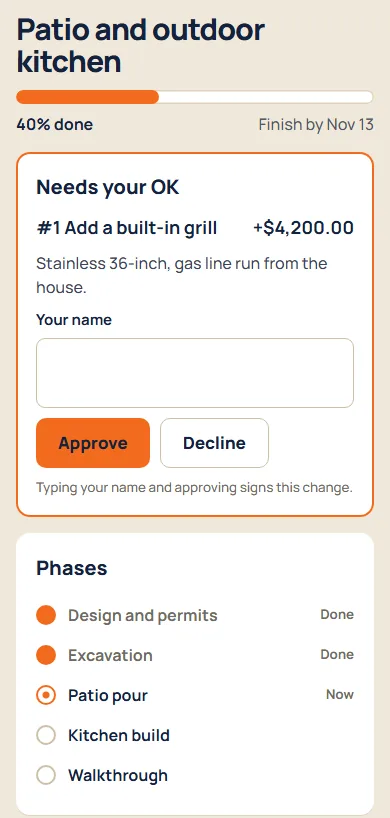
Every project has a private link for the customer. They see how far along it is, what got done with photos, and any change order waiting for their OK. No account, no app, no call to you.
What it does
Progress they can see
A progress bar, the phases done and the finish date.
Your updates, your choice
Only the log entries you mark as shared show up, with their photos.
Sign-off in one tap
They type their name and approve or decline. You see who signed and when.
In your colors
Your logo and brand color, not ours.
How it goes
- Copy the link from the project and text or email it.
- Share log entries as the work goes.
- Send a change order; it shows up on their page to sign.
Questions
Is the page public?
Only to people with the link, which is long and random. Anyone you send it to can see it, so treat it like a key.
Is a typed name a real signature?
It records who approved what and when, which is how most change orders get agreed. If your work needs a wet signature or a notary, use that too.