Projects that stay on budget, and a customer who knows where it stands.
For the work bigger than one visit: remodels, builds, installs. Crewbird tracks the phases, what it’s costing against the budget, the change orders your customer signs, and the punch list to the finish.
What it does
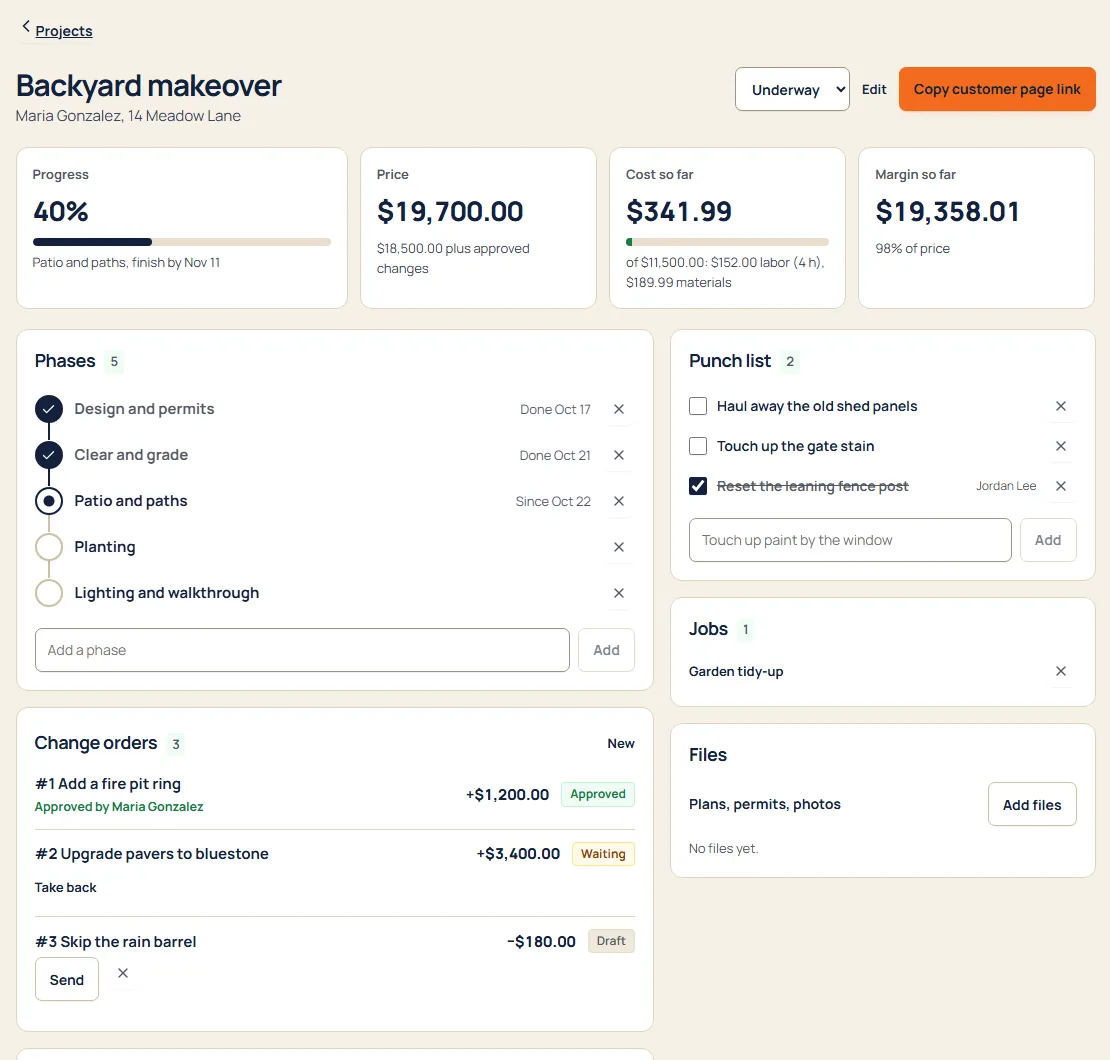
Phases at a glance
Plan, prep, build, finish. Tap a phase to mark it started or done.
Budget against actual
Labor from the visits your crew finished plus what you spent on materials, live against the budget.
Margin you can see
Price, cost so far and what’s left, before the job is over instead of after.
Change orders, signed
Send extra work for sign-off. The customer approves by name, and the price updates itself.
Punch list
The last little things, ticked off with who did them.
Daily log with photos
What got done each day. Share an entry and the customer sees it with the photos.
How it goes
- Start a project for a customer with a price, a cost budget and its phases.
- Add the customer’s jobs; their finished visits count as labor.
- Log each day and send change orders as the work changes.
- Send the customer their page link and close out the punch list.
Questions
How is labor cost worked out?
From finished visits on the project’s jobs: hours on site, times the people there, times the labor cost per hour you set for the project.
Does my customer need an account?
No. They get a private link to their project page. It shows progress, the updates you chose to share and any change orders waiting for them.
Is it on every plan?
Yes. Every part of Crewbird is on every plan. See pricing.