A page that books work while you’re on the job.
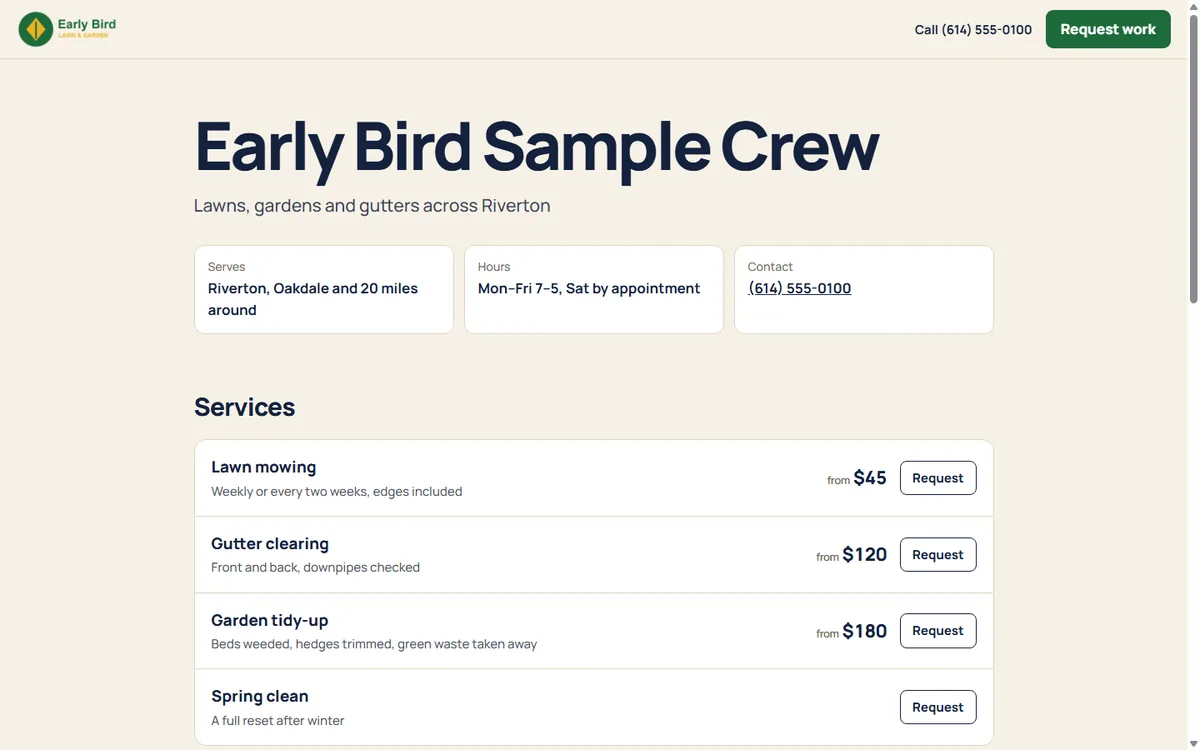
Every Crewbird business gets a public page: what you do, from what price, where and when. Customers send a request in a minute, and it lands in your inbox ready to become a quote or a job.
What it does
Your services and prices
List what you do with a “from” price, so people know before they call.
Requests, not voicemails
Name, address, what they need and when. No phone tag to get the basics.
One click to a quote or job
A request becomes a draft quote or a scheduled job, with the customer created for you.
Built for search
Each page carries the details search engines read: your services, area, hours and links.
Spam stays out
A quiet bot check and a daily limit keep the inbox for real customers.
Your brand on it
Your logo, your color and links to your Google, Facebook and Instagram pages.
How it goes
- Add your services, prices, service area and hours.
- Publish and share the link: on your truck, your cards, your Google profile.
- Requests show up in Customers and on Today, and you get an email.
- Turn one into a quote or a job in one step.
Questions
Does it cost extra?
No. The page is on every plan, and so are the requests it brings in. See pricing.
What’s the address?
crewbirdpro.com/b/ and a name you pick, like crewbirdpro.com/b/brightside. Your own domain is on the roadmap.
Can I tell which sign or flyer a request came from?
Yes. Every QR code from the print kit is tagged, and the request shows where it was found.