Jobs & schedule
Every job, every visit, every crew on one board.
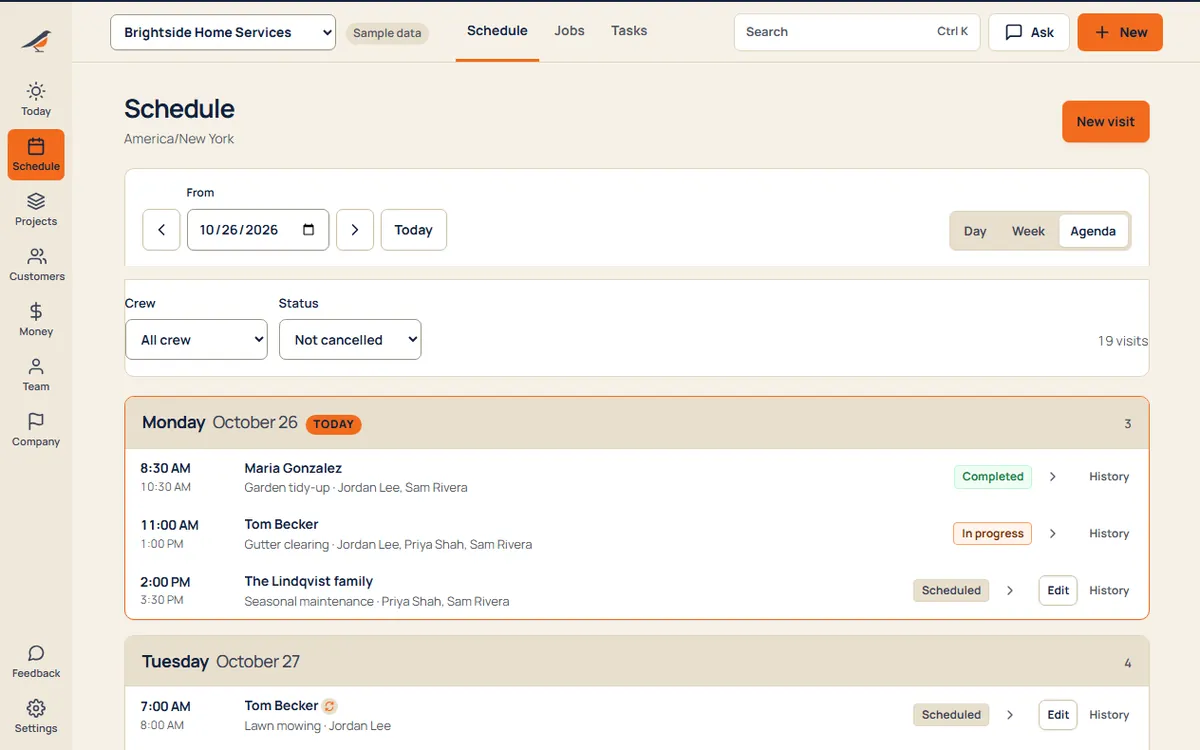
Book the work, put it on the board and send the crew. Each visit carries its address, checklist, notes and photos, so nobody calls you to ask what’s next.
What’s inside
Plan
- Jobs and visitsA job holds the work for a customer; visits are the days you show up. One job, many visits.
- Repeat workWeekly mowing or monthly cleaning books itself, with the dates you skip left out.
- The boardMove visits between people and days. Clashes and empty mornings show at a glance.
On site
- ChecklistsEach visit brings its own list. The crew ticks it off on their phone.
- Photos and signaturesBefore and after shots and a customer signature, filed on the visit.
- RoutesToday’s stops open in Google Maps in order, up to ten at a time.
After
- Done means doneFinished visits move to done, with the notes and photos for the office.
- Straight to invoiceTurn finished work into an invoice in one step, lines filled in.
- Find anythingSearch customers, jobs, people and places from one box.
A day with it
- A customer asks for work, by phone or on your booking page.
- You make the job and book its visits on the board.
- The crew opens Today on their phone and sees their stops in order.
- They tick the checklist, add photos and mark it done.
- You send the invoice the same evening, or the same minute.
What it replaces
- The whiteboard
- The group chat
- Paper work orders
- A separate calendar app
Try jobs & schedule with sample work in it.
Questions
Can crew see every job?
No. Crew see the visits they’re on. Owners and office see the whole business. Who sees what.
Does it work on a phone?
Yes. It runs in any phone’s browser, with buttons sized for a thumb in a glove.
Can I bring my jobs over?
Yes. Import customers from a spreadsheet or another app’s export. See switching.
Every suite. One price.
14 days free. No contract. Your crew is set up in an afternoon.